1. Export a CSV file from Krock.io
To export comments from Krock.io, select the video and open the menu via the three dot icon. Select "Export comments to csv" to export the comments.
2. Use the "Konwerter znaczników" to convert the CSV file into a CSV file
Open the free Konwerter znaczników, select "Krock.io > Comments (.csv)" and set "convert" to "CSV for Google Sheets". Generate and download the file. Jeśli masz problemy z konwersją pliku, możesz skontaktować się z bezpłatną pomocą techniczną.
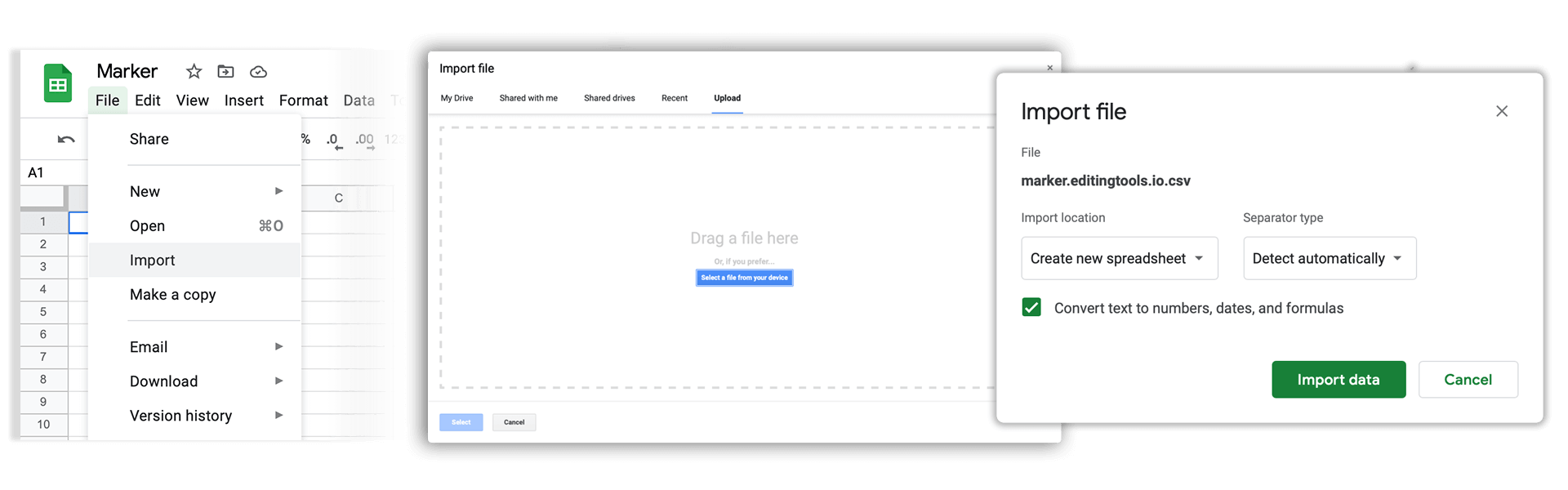
3. Import the CSV file into Google Sheets
Open Google Sheets and go to "File -> Import". Upload the generated CSV file and press "Import Data" to generate the Sheet with all markers.
🚀 Gotowe
To na razie wszystko! Jeśli ten samouczek okazał się przydatny, udostępnij go, aby nas wesprzeć. Jeśli masz sugestie, jak moglibyśmy usprawnić ten przepływ pracy, daj nam znać!