1. Export a Final Cut 7 XML marker file from Adobe Premiere Pro
Open the sequence in Premiere Pro and go to File > Export > "Final Cut Pro XML".
2. Use the "Konwerter znaczników" to convert the Final Cut 7 XML marker file into a CSV file
Open the free Konwerter znaczników, select "Adobe Premiere Pro > Sequence (.xml)" and set "convert" to "CSV for Google Sheets". Generate and download the file. Jeśli masz problemy z konwersją pliku, możesz skontaktować się z bezpłatną pomocą techniczną.
3. Import the CSV file into Google Sheets
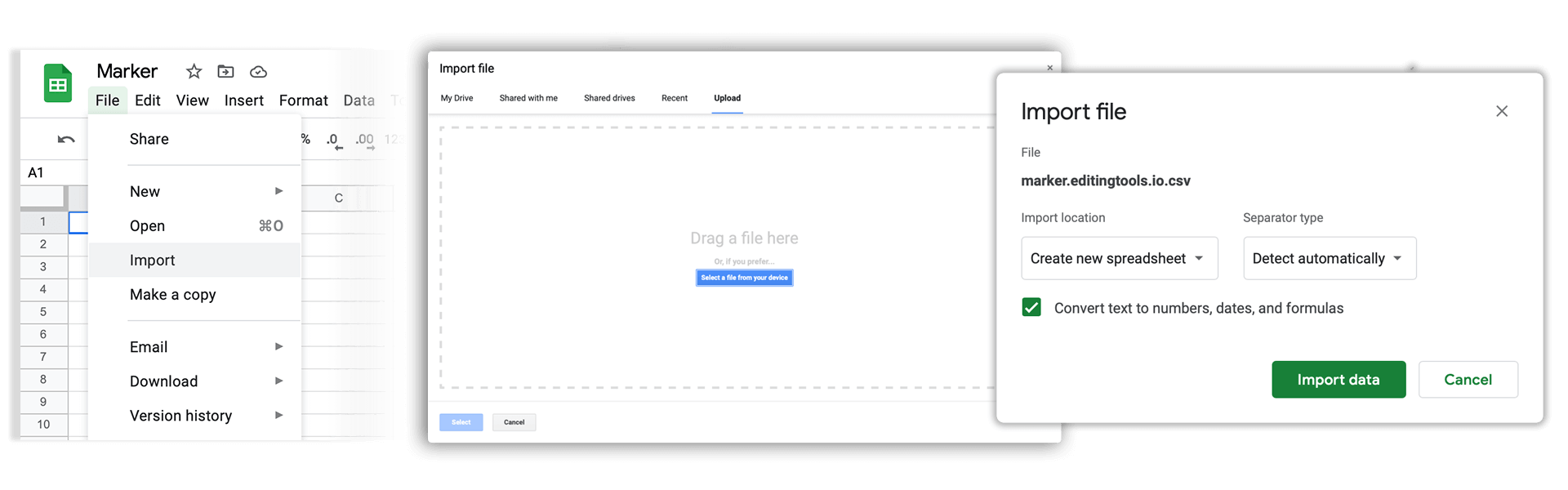
Open Google Sheets and go to "File -> Import". Upload the generated CSV file and press "Import Data" to generate the Sheet with all markers.
🚀 Gotowe
To na razie wszystko! Jeśli ten samouczek okazał się przydatny, udostępnij go, aby nas wesprzeć. Jeśli masz sugestie, jak moglibyśmy usprawnić ten przepływ pracy, daj nam znać!