1. Export a CSV marker file from Pix
Open the comments panel on the right side in Pix. Press the three dots and select "Export". Now you can then download the CSV file from Pix.
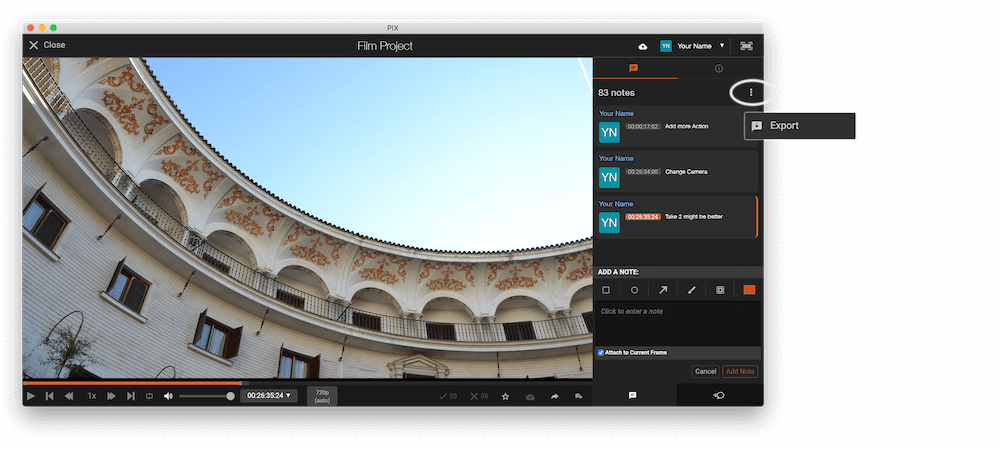
The timecode in Pix starts with 00:00:00:00 for each clip, so you may need to use the offset function on EditingTools.io to sync it with you timeline or move it manually in your NLE (editing software).
2. Use the "Konwerter znaczników" to convert the CSV marker file into a SRT subtitle file
Open the free Konwerter znaczników, select "Pix Systems > Comments (.csv)" and set "convert" to "SRT". Generate and download the file. Jeśli masz problemy z konwersją pliku, możesz skontaktować się z bezpłatną pomocą techniczną.
3. Import the SRT subtitle file in Adobe Premiere Pro
Open your project in Premiere Pro and go to File > Import. Select the SRT file and import it. You can drag and drop the subtitle file simply into your sequence.
🚀 Gotowe
To na razie wszystko! Jeśli ten samouczek okazał się przydatny, udostępnij go, aby nas wesprzeć. Jeśli masz sugestie, jak moglibyśmy usprawnić ten przepływ pracy, daj nam znać!