1. Export a CSV marker file from Pix
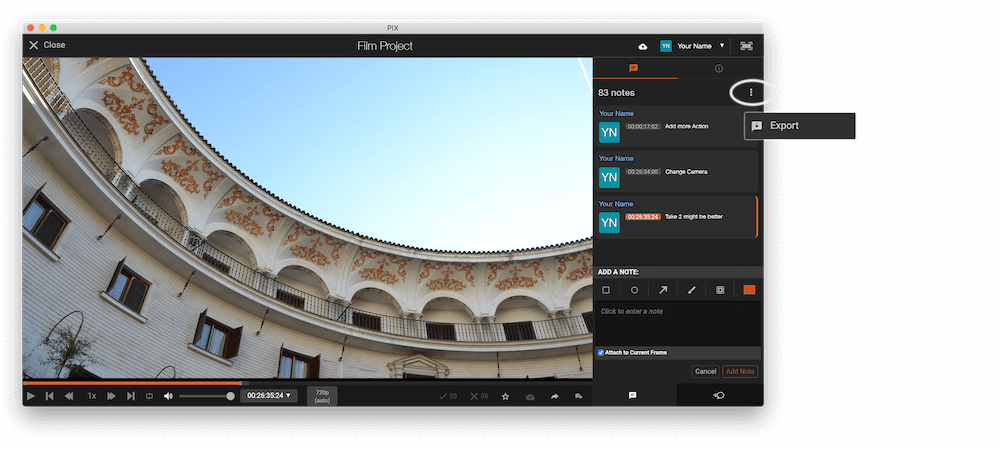
Open the comments panel on the right side in Pix. Press the three dots and select "Export". Now you can then download the CSV file from Pix.
2. Use the "Konwerter znaczników" to convert the CSV marker file into a SRT subtitle file
Open the free Konwerter znaczników, select "Pix Systems > Comments (.csv)" and set "convert" to "SRT". Generate and download the file. Jeśli masz problemy z konwersją pliku, możesz skontaktować się z bezpłatną pomocą techniczną.
3. Use the "Narzędzie do napisów i konwerter" to convert the SRT subtitle file into an ASS subtitle file
Open the free Narzędzie do napisów i konwerter, select "SRT" and set "convert" to "ASS". Generate and download the file. Jeśli masz problemy z konwersją pliku, możesz skontaktować się z bezpłatną pomocą techniczną.
🚀 Gotowe
To na razie wszystko! Jeśli ten samouczek okazał się przydatny, udostępnij go, aby nas wesprzeć. Jeśli masz sugestie, jak moglibyśmy usprawnić ten przepływ pracy, daj nam znać!