1. Use the "Narzędzie do napisów i konwerter" to convert a Subtitle Horse JSON file into a CSV file
Open the free Narzędzie do napisów i konwerter, select "Subtitle Horse JSON" and set "convert" to "CSV for Google Sheets". Generate and download the file. Jeśli masz problemy z konwersją pliku, możesz skontaktować się z bezpłatną pomocą techniczną.
2. Import the CSV file into Google Sheets
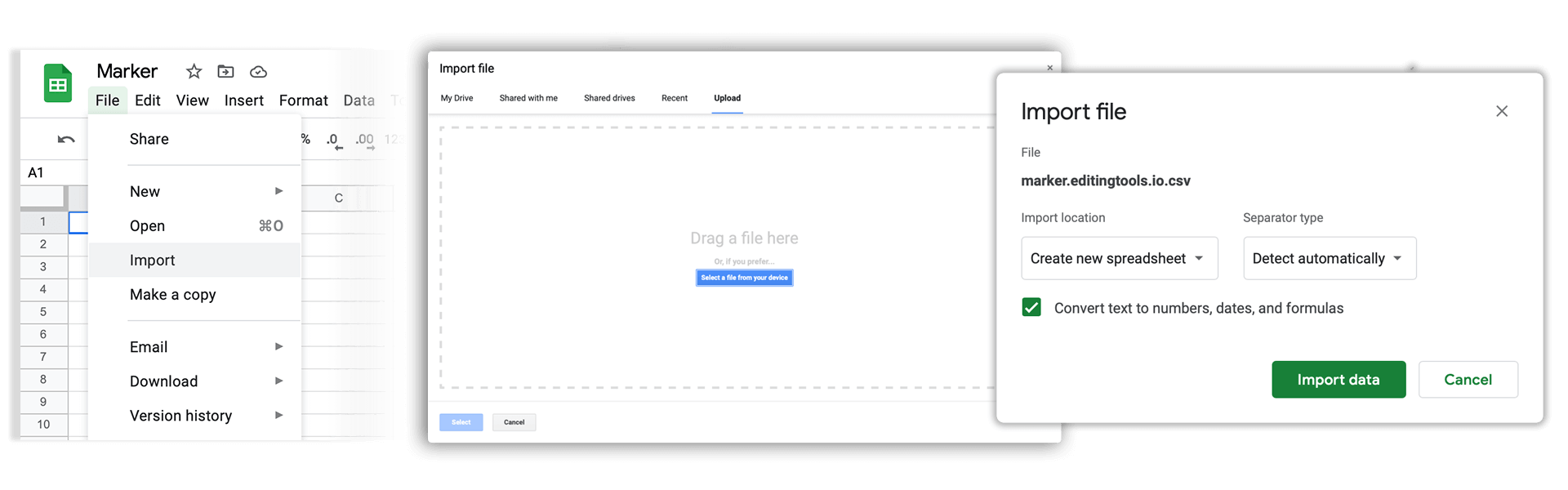
Open Google Sheets and go to "File -> Import". Upload the generated CSV file and press "Import Data" to generate the Sheet with all markers.
🚀 Gotowe
To na razie wszystko! Jeśli ten samouczek okazał się przydatny, udostępnij go, aby nas wesprzeć. Jeśli masz sugestie, jak moglibyśmy usprawnić ten przepływ pracy, daj nam znać!